

Shopify NPS Survey: How to Measure Customer Loyalty Across Email & Storefront
If you run a store on Shopify, customer feedback is often scattered.
- Product reviews inside Shopify
- Post-purchase emails in Klaviyo
- Support tickets in Zendesk
- Refund reasons in your admin dashboard
But none of these provide a consistent measure of customer loyalty.
A properly implemented Shopify NPS survey gives you that signal.
And when combined with CSAT and other feedback types, it becomes a centralized view of how customers truly feel about your brand.
What Is a Shopify NPS Survey?
A NPS survey is a Net Promoter Score survey sent to customers after a meaningful interaction — typically post-purchase, after delivery, or at a milestone like a second order.
The NPS question asks:
“On a scale of 0–10, how likely are you to recommend us to a friend or colleague?”
Customers are categorized as:
- Promoters (9–10) – loyal, repeat buyers
- Passives (7–8) – satisfied but not enthusiastic
- Detractors (0–6) – at risk of churn
Your NPS score is calculated as:
% Promoters – % Detractors
Unlike product reviews (which focus on a specific item), NPS measures overall brand loyalty.
For Shopify stores, which connect directly to:
- Repeat purchase rate
- Subscription renewals
- Customer lifetime value (LTV)
- Word-of-mouth growth
How to Implement NPS Survey on Shopify
There are two effective ways to collect NPS in Shopify:
- Via email (post-purchase flows)
- Directly inside your storefront using a Web SDK
The most effective brands use both.
Method 1: Collect NPS via Email (Post-Purchase Flow)
Most Shopify brands already use an email platform such as:
- Klaviyo
- Shopify Email
- ActiveCampaign
Instead of building custom tracking inside each tool, you can use Elvan to power the NPS logic and let your email platform handle delivery.
Step 1: Create Your NPS Survey in Elvan
- Create a free account at elvan.ai
- Click Create Project
- Select Net Promoter Score
- Customize your question
- Add an optional follow-up comment question
- Publish
Your Shopify NPS survey backend is now ready.
Step 2: Enable Inline Embed
Inside your project:
- Go to Distribute → Inline Embed
- Click Enable Embed
- Copy the HTML code
The embed:
- Displays 0–10 clickable score buttons
- Uses email-safe HTML
- Records the score instantly
- Optionally collects written feedback
- Requires no JavaScript
Step 3: Add It to Your Shopify Email Flow
In your email platform:
- Add a Custom HTML block
- Paste the embed code
- Replace the email placeholder with your platform’s personalization tag
Best timing for Shopify NPS surveys:
- 30 days after purchase
- After second purchase
- After subscription renewal
- Quarterly for repeat buyers
This captures relationship-level loyalty rather than immediate transaction satisfaction.
Method 2: Collect NPS Directly in Your Shopify Store (Web SDK)
Email captures feedback later in the journey.
If you want contextual, in-the-moment feedback, use the Elvan Web SDK inside your Shopify store.
Examples:
- After checkout completion
- After login
- After subscription upgrade
- After a third purchase milestone
Step 1: Add the Script to Your Shopify Theme
Go to:
Online Store → Themes → Edit Code
Add inside your <head>:
<script src="https://cdn.elvan.ai/sdk/v1/elvan.js">
</script>
Step 2: Initialize the SDK
window.Elvan.init({ token: 'YOUR_SDK_TOKEN', debug: false});
Step 3: Trigger the Survey at the Right Moment
window.Elvan.trigger({ email: customer.email, name: customer.first_name});
Now your Shopify NPS survey can appear contextually inside the customer journey.
Why Combine Email and On-Site NPS?
Email captures reflective feedback.
On-site triggers capture contextual feedback.
Together, they provide a more accurate picture of customer loyalty.
But the real advantage isn’t just collection — it’s consolidation.
One Dashboard for NPS, CSAT, and Customer Feedback
Most Shopify brands collect feedback in multiple systems:
- Reviews inside Shopify
- CSAT inside support tools
- NPS in email tools
- Ad-hoc surveys elsewhere
This leads to fragmented insight.
With Elvan, you can centralize:
All inside one dashboard.
Instead of guessing why repeat purchase rate is dropping, you see patterns immediately:
- Recurring shipping complaints
- Product sizing issues
- Subscription cancellation themes
- Pricing confusion
Elvan’s AI groups feed back into themes and surfaces early warning signals — without manually reviewing every comment.
Shopify NPS vs CSAT: When to Use Each
If you’ve already implemented post-purchase CSAT, here’s how they differ:
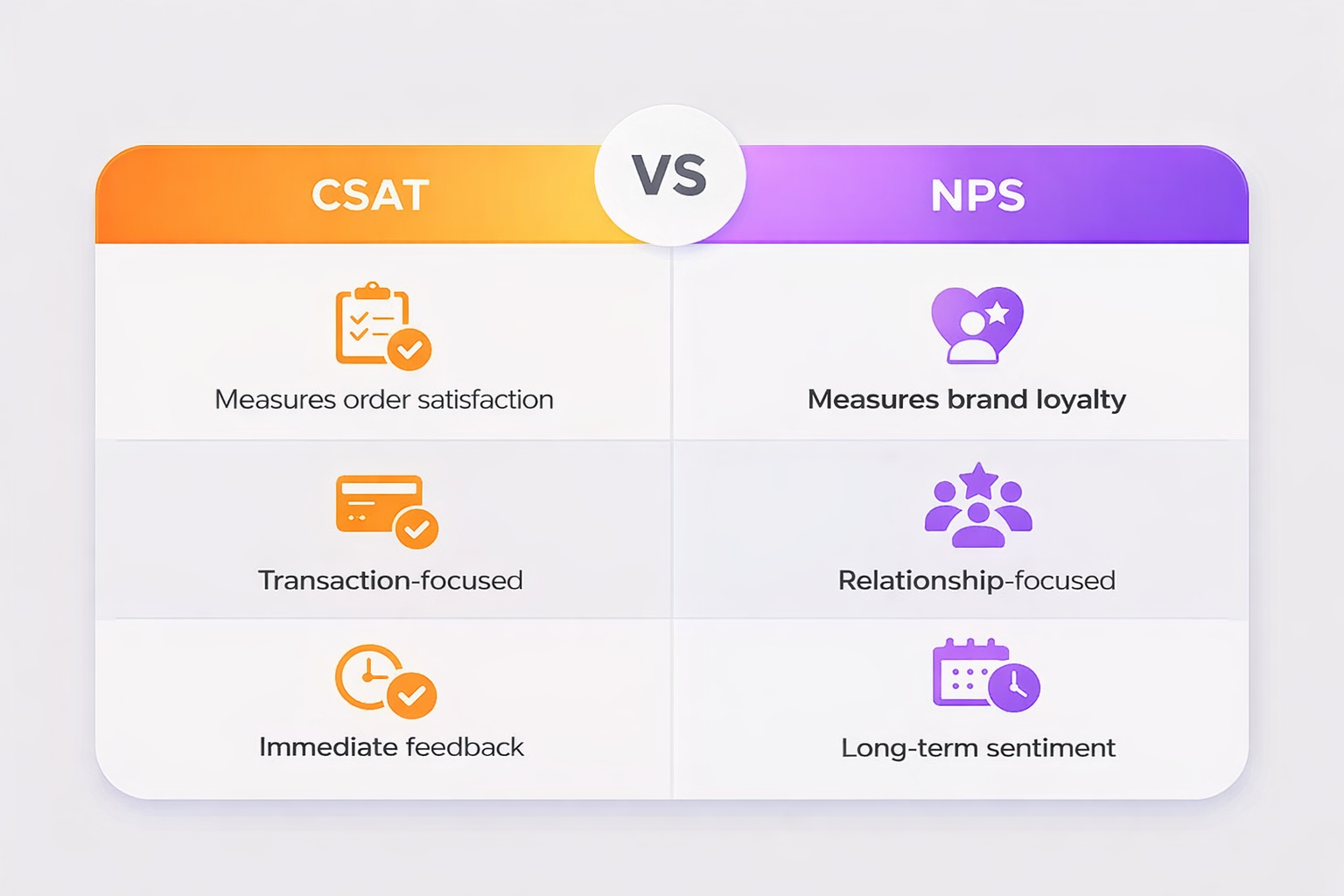
Best practice for Shopify brands:
- CSAT after fulfillment
- NPS 30 days later
- Web SDK NPS at milestone events
Together, they create a full feedback loop.
How High-Growth Shopify Brands Use NPS
Smart eCommerce brands use NPS surveys to:
- Identify churn risk early
- Segment Promoters for referral programs
- Improve subscription retention
- Validate product-market fit
- Optimize repeat purchase campaigns
NPS becomes more than a metric — it becomes a strategic signal.
Start Your NPS Survey Today
Shopify gives you revenue data.
Reviews give you product feedback.
An NPS survey provides structured loyalty insights.
You can implement it in under 10 minutes and centralize all customer feedback in one place.
Elvan’s free plan includes:
- 100 responses
- 1 project
- No credit card required
Create your survey at Elvan and start measuring customer loyalty today.

Neil Roy
Content Strategist
Neil is a content strategist specializing in CSAT and NPS surveys, creating educational content that helps businesses understand and improve customer satisfaction. With 10+ years of experience, Neil writes insightful articles and develops content strategies that translate complex survey concepts into accessible, actionable guidance for organizations looking to enhance their customer relationships and business outcomes.