

Post-purchase CSAT for Shopify: Step-by-Step Setup Guide
Post-purchase CSAT for Shopify is a customer satisfaction survey shown immediately after a customer completes checkout.
It measures how satisfied customers are with:
- The checkout flow
- Payment experience
- Shipping clarity
- Overall purchase process
What You’ll Set Up in This Guide
By the end of this guide, you’ll have:
- A CSAT project in Elvan
- The Web SDK enabled
- An event-based trigger
- A Shopify CSAT survey shown post-checkout
Step 1: Create a New CSAT Project in Elvan
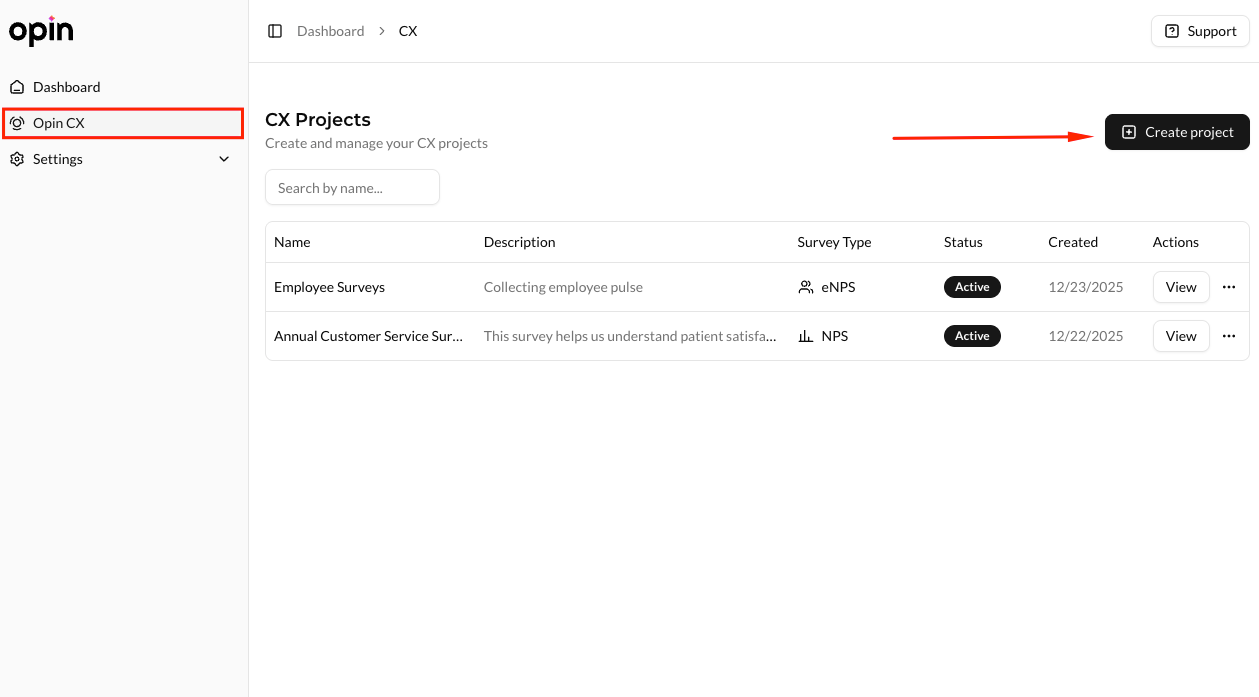
From your Elvan dashboard, go to:
Dashboard → CX → Create
You’ll see a list of available survey types.
Step 2: Choose Customer Satisfaction (CSAT)
Select Customer Satisfaction from the list.
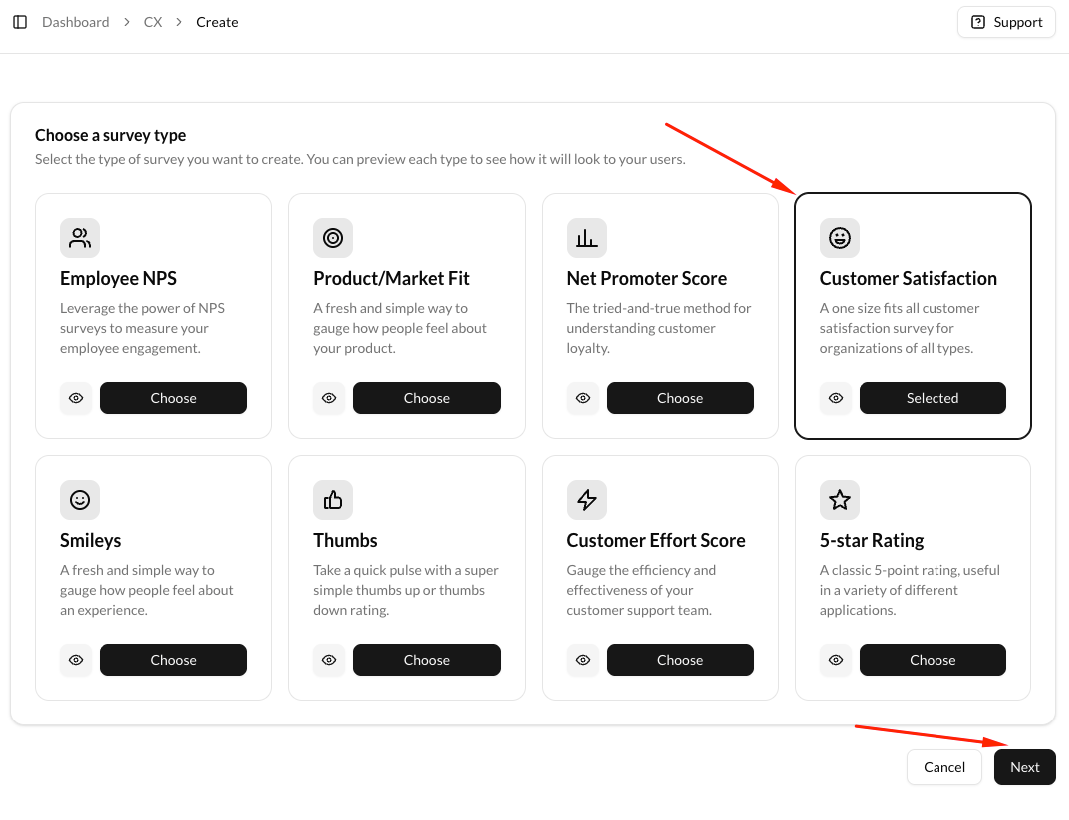
CSAT is the right choice for post-purchase feedback because it focuses on immediate experience, not long-term loyalty.
Step 3: Configure Your Shopify CSAT Survey
Fill in the project details.
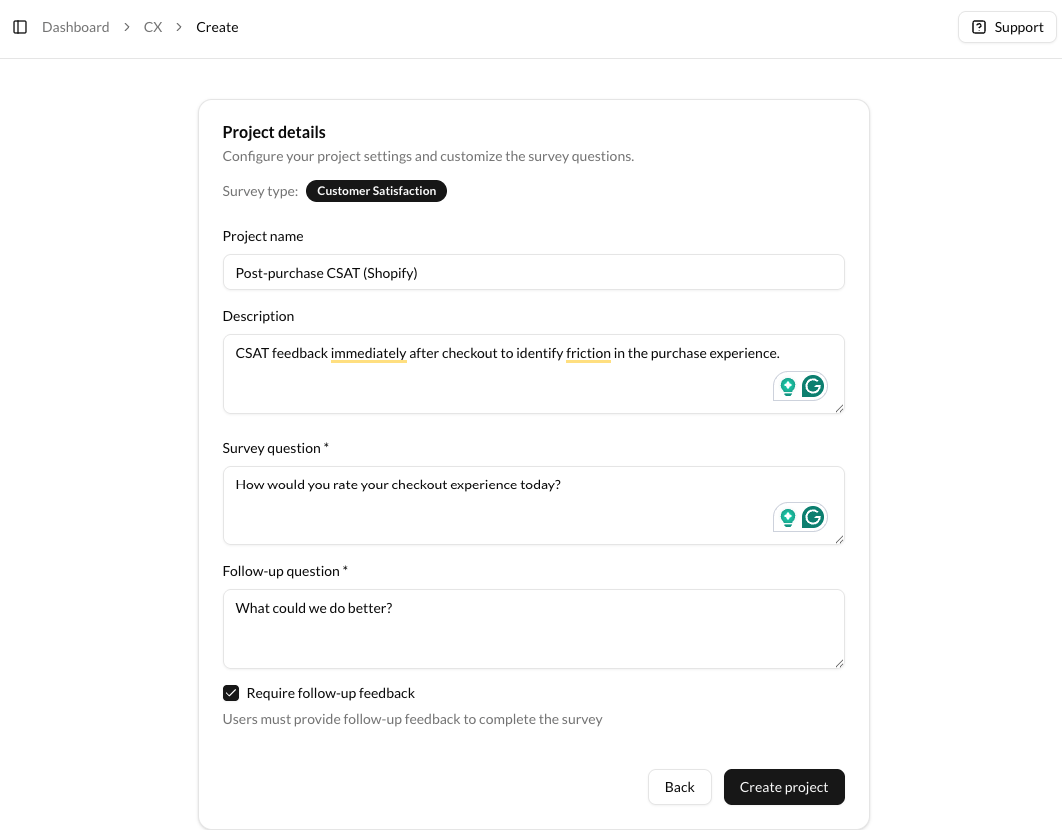
Recommended configuration:
- Project name: CSAT for Post-checkout
- Survey question: How satisfied are you with our checkout experience?
- Follow-up question: What could we do better?
Keep questions short and direct.
Avoid adding extra steps.
Step 4: Open Settings and Scroll to Web SDK
Once the project is created, open the Settings tab.
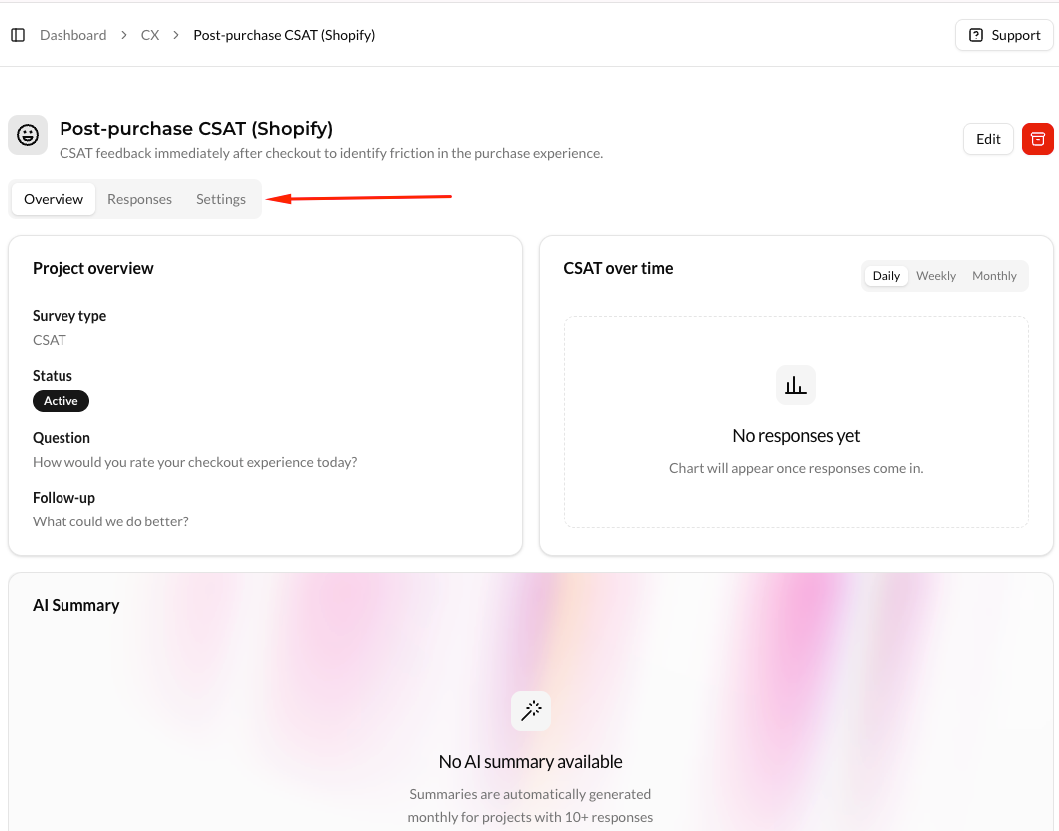
You’ll see options for survey links and email campaigns.
You don’t need to configure those for post-purchase CSAT.
Scroll down to the Web SDK section.
Step 5: Enable the Web SDK
In the Web SDK section, click Enable Web SDK.
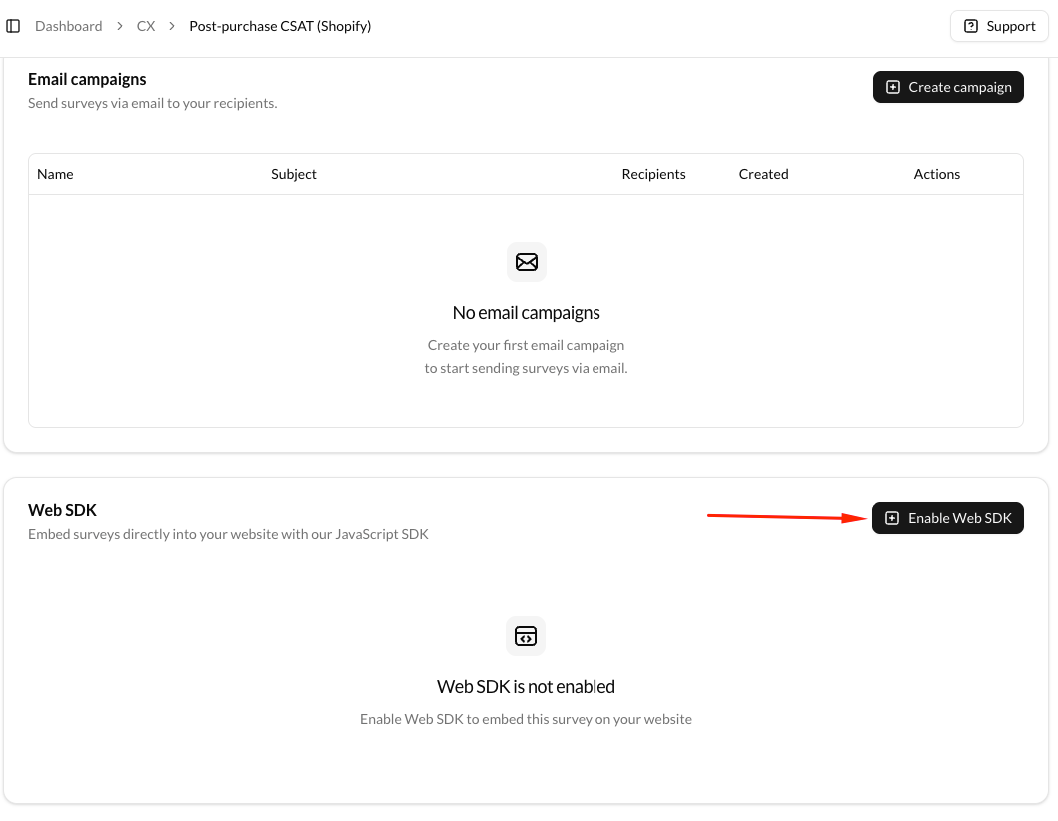
This allows Elvan to show surveys directly inside your Shopify store.
Step 6: Select Event-based Triggering
When asked to choose a trigger type, select Event-based.
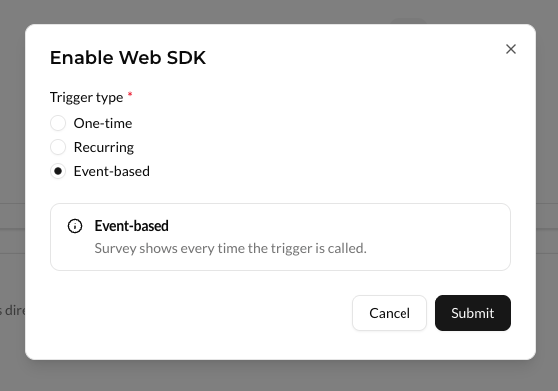
Event-based triggering lets Shopify control exactly when the CSAT survey appears.
Step 7: Copy the Web SDK Token and Instructions
Once enabled, the Web SDK becomes active.
You’ll see:
- Your SDK token
- The script to add to your site
- Example trigger code
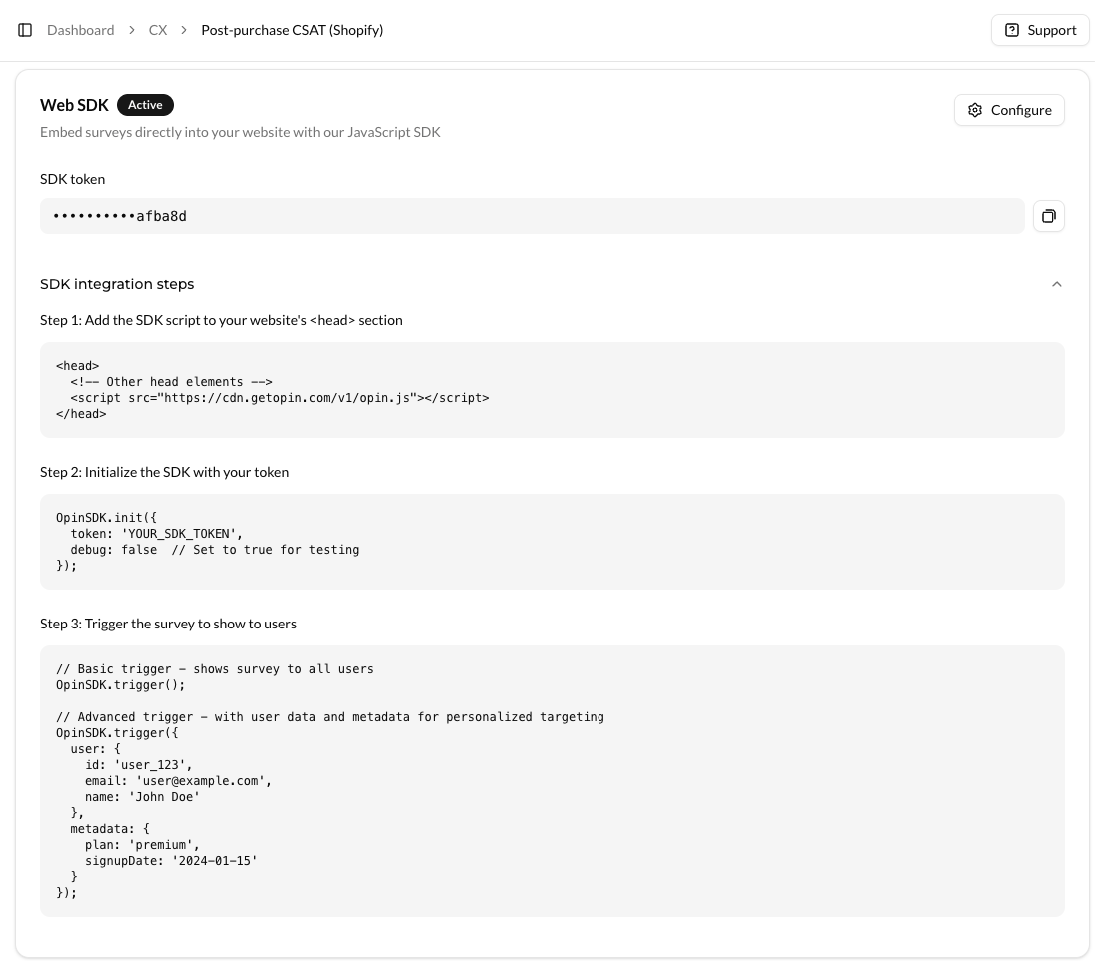
Keep this page open for the Shopify setup.
Step 8: Add the Elvan SDK to Shopify
In Shopify, go to:
Admin → Online Store → Themes → Edit code
Open theme.liquid and add the following inside the <head> tag:
<script src="https://cdn.elvan.ai/v1/elvan.js"></script>
<script>
  ElvanSDK.init({
    token: "YOUR_SDK_TOKEN",
    debug: false
  });
</script>
This loads Elvan across your Shopify storefront.
Step 9: Trigger the CSAT Survey After Checkout
On the Shopify order confirmation (thank-you) page, add:
<script>
  ElvanSDK.trigger({
    user: {
      id: "{{ customer.id }}",
      email: "{{ customer.email }}"
    },
    metadata: {
      order_id: "{{ order.id }}",
      total_price: "{{ order.total_price }}"
    }
  });
</script>
Your Shopify CSAT survey will now appear immediately after checkout.
What This Shopify CSAT Setup Gives You
With post-purchase CSAT configured this way:
- Surveys trigger only after successful orders
- Feedback is tied to real purchases
- Responses are timely and contextual
This is the most reliable way to collect post-purchase feedback on Shopify.
Common Shopify CSAT Mistakes to Avoid
- Showing CSAT before payment is complete
- Relying only on email surveys
- Asking more than two questions
- Mixing CSAT and NPS in the same flow
Post-purchase CSAT should stay focused.
FAQ: Post-purchase CSAT for Shopify
What is post-purchase CSAT?
Post-purchase CSAT is a customer satisfaction survey shown immediately after checkout to measure how customers felt about the purchase experience.
When should CSAT be triggered on Shopify?
Right after checkout, on the order confirmation page.
Will post-purchase CSAT affect conversions?
No. The survey appears only after payment is complete.
Do I need Shopify Plus to use this?
No. This setup works on standard Shopify plans.
Can I use the same setup for NPS or CES?
Yes. The same Web SDK supports CSAT, NPS, CES, PMF, and other surveys.

Neil Roy
Content Strategist
Neil is a content strategist specializing in CSAT and NPS surveys, creating educational content that helps businesses understand and improve customer satisfaction. With 10+ years of experience, Neil writes insightful articles and develops content strategies that translate complex survey concepts into accessible, actionable guidance for organizations looking to enhance their customer relationships and business outcomes.