

The Exit Survey Most SaaS Teams Never Send (And Why It Costs Them Thousands)
Every month, a chunk of your customers cancel. You see the number in your dashboard. Maybe you send a "we're sorry to see you go" email three days later with a link to a survey. Almost nobody clicks it.
Here is the uncomfortable part: the problem is not that customers refuse to tell you why they left. The problem is that you asked too late.
Customers are 3 to 5 times more likely to respond to an exit survey triggered at the moment of cancellation compared to one sent hours or days later by email. Post-cancellation emails average roughly an 8% response rate. In-app surveys triggered during the cancellation flow routinely hit 30% or higher. Some companies report completion rates north of 50%.
That gap is not a rounding error. It is the difference between understanding your churn and guessing at it.
And yet, most SMB SaaS teams either skip the exit survey entirely or treat it as an afterthought. This article is about fixing that. What to ask, when to ask it, how to structure the flow, and what to actually do with the data once you have it.
Why SMB SaaS Teams Get This Wrong
Large enterprise SaaS companies have entire teams dedicated to churn analysis. They run cohort studies, build predictive models, and have retention specialists calling at-risk accounts weeks before renewal.
SMB SaaS does not have that luxury.
The typical SMB-focused product has a Head of Customer Success who is also running onboarding, handling escalations, and managing the help center. There is no churn analyst. There is no data science team building predictive models. There is one person, maybe two, trying to keep a growing customer base happy while also closing new deals.
For context, SMB-focused SaaS products typically see monthly churn rates between 3% and 5%. At scale, that means for every 1,000 customers, you are losing 30 to 50 per month. If your average contract value is $50/month, that is $1,500 to $2,500 in MRR walking out the door every single month.
The standard playbook says "reduce churn." Great. But you cannot reduce what you do not understand, and you cannot understand it without data from the people who actually left.
That is where the exit survey comes in. Not the one sitting in your backlog. The one that fires the moment someone hits "Cancel my account."
The Timing Problem Nobody Talks About
There is a psychological window that opens when someone cancels a subscription. In the moments immediately following that action, the customer is doing something rare: they are actively thinking about your product, your shortcomings, and their decision. Their reasoning is fresh, organized, and specific.
Twenty-four hours later? They have moved on. They are setting up the replacement tool. They are back in their workflow. The frustration that pushed them to cancel has faded into a vague memory, and the odds that they will open your email, click a link, load a survey, and type out their thoughts drop dramatically.
This is why the data consistently shows that in-app exit surveys, triggered during the cancellation flow itself, outperform delayed email surveys by a wide margin. The response is not just more frequent. It is more honest, more detailed, and more actionable.
The best exit surveys do not feel like a survey at all. They feel like the product asking one last genuine question before letting the customer go.
What To Ask: Keep It Short, Keep It Open
The instinct is to ask everything. You want to know if pricing was the issue, if they found a competitor, if the product was missing a feature, if support let them down. So you build a 10-question survey with dropdowns, rating scales, and matrix grids.
Nobody completes it.
The customer is in the middle of cancelling. They are not in a generous mood. They are not going to spend five minutes documenting their experience for your benefit.
Two questions. That is the sweet spot.
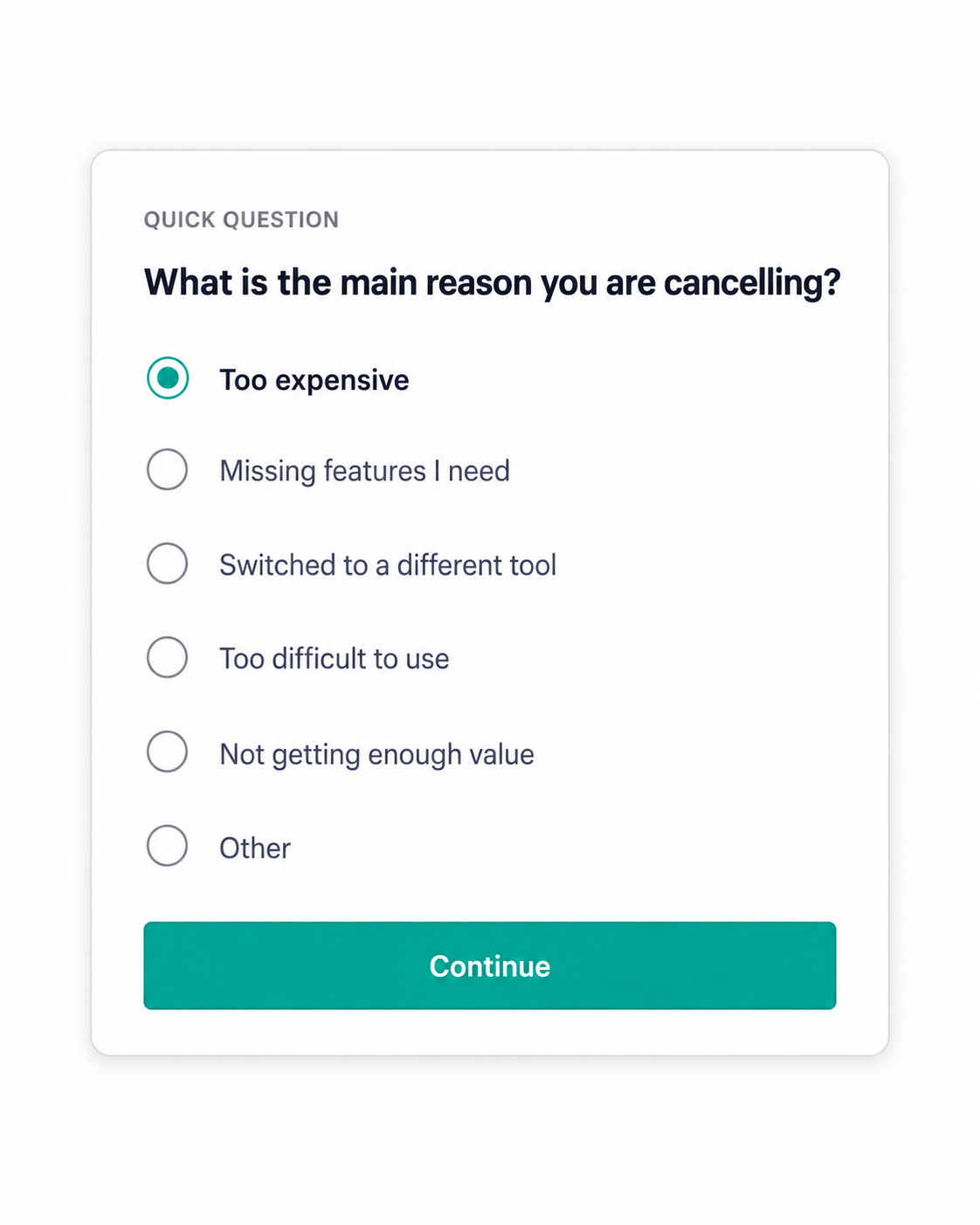
Question one: "What is the main reason you are cancelling?"
This should be a single-select question with 5 to 7 predefined options. Keep the list focused on the reasons that are actually actionable for your team. A good starting set for most SMB SaaS products looks something like this:
Too expensive, missing features I need, switched to a different tool, no longer need this type of product, too difficult to use, not getting enough value.
Always include an "Other" option with a free-text field. Some of the most valuable insights come from the reasons you did not think to list.
Question two: "Is there anything we could have done differently?"
This one should be open-ended. No dropdown. No multiple choice. Just a text box.
This is the question that surfaces the real story. The first question tells you the category. The second question tells you the specifics. "Too expensive" is a category. "I was paying $79/month and only using NPS surveys, which felt like too much for one feature" is an insight you can act on.
One company famously increased their exit survey response rate by 785% simply by switching from closed-ended questions to open-ended ones and rephrasing from "Why did you cancel?" to "What made you cancel?" That small change in framing nearly doubled their conversion rate on the open-ended version.
The lesson: do not overthink the question design. Two questions, one structured and one open, triggered at the right moment. That is the entire formula.
The Anatomy of a Good Cancellation Flow
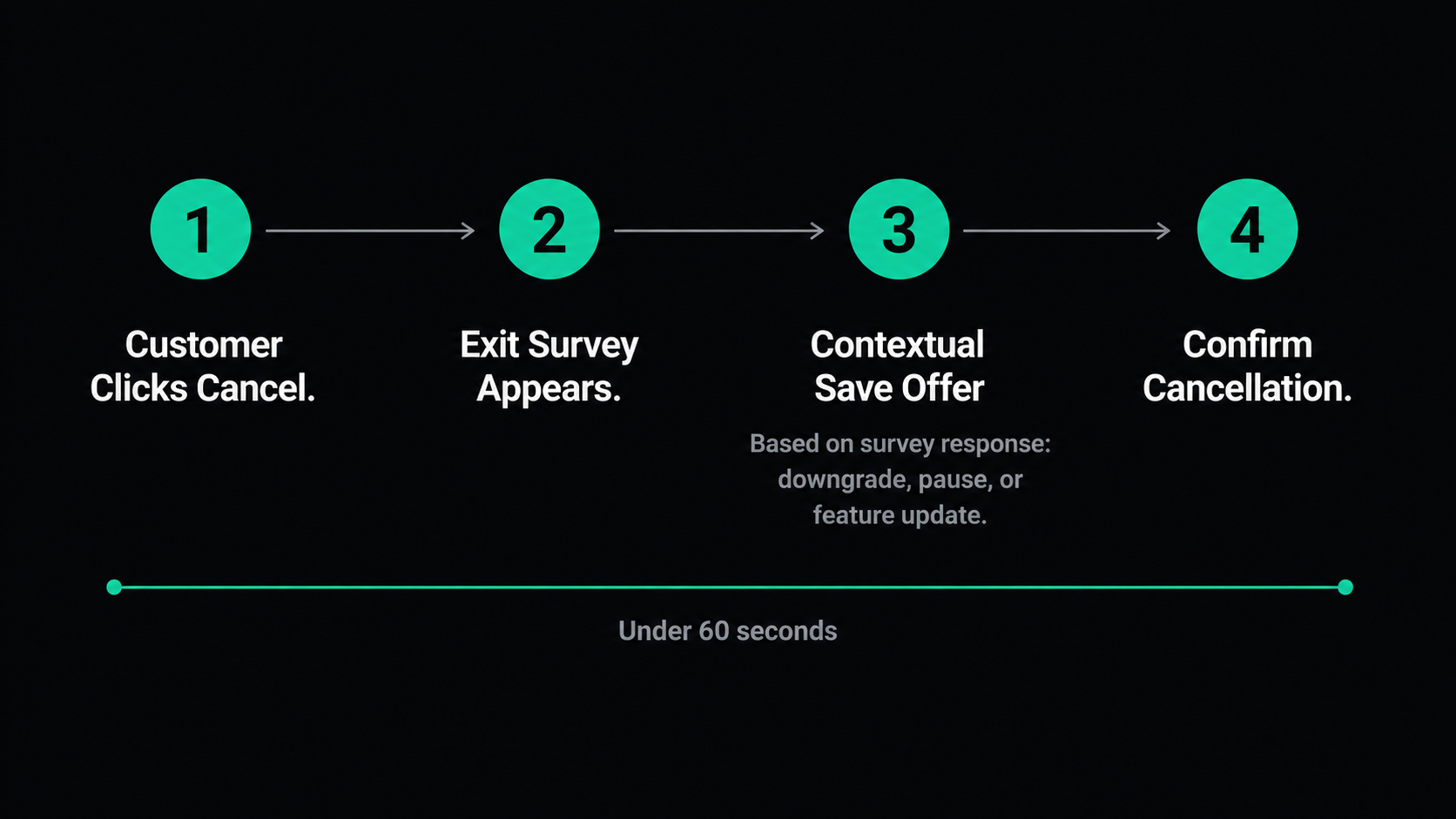
The exit survey should not exist in isolation. It should be embedded inside the cancellation flow itself. Here is what a well-structured cancellation flow looks like for an SMB SaaS product, broken into steps.
Step 1: The customer clicks "Cancel." Do not hide this button. Do not make them email support. Do not route them through a phone call. Friction at this stage does not prevent churn. It creates resentment and guarantees you will never hear from this customer again.
Step 2: The exit survey appears. Immediately. Before the cancellation is processed. Frame it as: "Before you go, help us understand what happened." One to two questions. The customer can skip it, but most will not if the questions are short and genuine.
Step 3: Present a contextual offer based on their response. If they selected "Too expensive," offer a downgrade or a temporary discount. If they selected "Missing features," show them the roadmap or offer to collect their feature request. If they selected "No longer need this," let them go gracefully. This step is optional but powerful. Well-optimized save flows recover 10% to 34% of cancellations. Offering a pause option instead of a hard cancel converts roughly 25% of would-be churners into paused accounts, and the majority of those reactivate later.
Step 4: Confirm the cancellation. Thank them. Tell them their data will be available if they decide to come back. Leave the door open without being desperate.
The entire flow takes under 60 seconds. The customer feels heard. You get data. Everyone moves on.
What To Do With the Data
Collecting exit survey responses is not the goal. Changing behavior based on what they tell you is the goal.
Here is how to turn raw cancellation data into retention improvements.
Categorize by reason, track over time. Every month, look at the distribution of cancellation reasons. If "too expensive" made up 15% of cancellations last quarter and now it is 30%, something changed. Maybe a competitor dropped their price. Maybe you raised yours. Maybe your value delivery slipped. The trend matters more than any individual response.
Route specific responses to the right team. "Missing features" responses go to product. "Too difficult to use" goes to onboarding and UX. "Switched to a different tool" goes to competitive intelligence. Do not dump all exit survey data into a shared spreadsheet and hope someone reads it. Build a simple routing system so that the right people see the right feedback.
Close the loop on patterns. If 40% of your cancellations cite the same missing feature, that is not a feature request. That is a retention problem disguised as a product gap. Prioritize it accordingly.
Use the data for win-back campaigns. Up to 30% of cancelled SaaS customers eventually return. The probability of selling to a former customer is 20% to 40%, compared to 5% to 20% for a new prospect. A well-timed win-back email, sent 30 days after cancellation, that references what has changed since they left performs significantly better than a generic "we miss you" message. And the exit survey data is what tells you what to reference.
Feed it into your AI insights. This is where modern feedback tools earn their keep. Manually reading 50 open-ended responses per month is doable. Reading 500 is not. AI-powered analysis can surface patterns, group similar responses into themes, and generate actionable summaries that a Head of CS can take straight into a quarterly business review. At Elvan, this is exactly what our AI Summary does: it takes your response data and turns it into plain-English insights with specific recommendations, so you are not staring at a spreadsheet trying to find the signal.
The Questions Most Teams Forget To Ask
Beyond the core two-question exit survey, there are a few additional data points worth capturing. You do not need to ask all of these. Pick the one or two that matter most for your current stage.
"How likely are you to use us again in the future?" This is a re-engagement signal. A customer who says "very likely" is a warm lead for a win-back campaign in 90 days. A customer who says "never" is telling you something deeper about the experience.
"Would you recommend us to someone else, despite cancelling?" This sounds counterintuitive, but some customers cancel for reasons that have nothing to do with product quality. They outgrew you, their company shut down a project, or their budget got cut. These people are still potential advocates. Knowing who they are matters.
"What tool are you switching to?" If you ask this, make it optional. Not everyone will answer, but those who do give you competitive intelligence you cannot get anywhere else. If 60% of your churned customers are switching to the same competitor, you have a positioning problem, not a product problem.
How Elvan Makes This Easy
Most SMB SaaS teams know they should run exit surveys. The reason they do not is simple: the tools available are either too complex to set up, too expensive to justify, or both.
That is the gap Elvan was built to fill.
With Elvan, you can create a cancellation survey in under 20 minutes. Choose from survey types purpose-built for this use case, including CSAT for measuring satisfaction at the point of exit, CES for understanding how much friction the customer experienced, or a simple 5-Star or Thumbs Up/Down format for the fastest possible feedback capture.
Deploy through five channels: a shareable web link you can embed in your cancellation confirmation page, a lightweight Web SDK that triggers the survey inside your product at the exact moment of cancellation, an embed that drops into your existing email tools like HubSpot, Klaviyo, or Mailchimp, Elvan-managed email for sending surveys to a list of recently cancelled accounts, or a native Zendesk integration that triggers automatically when tickets are resolved.
Every survey is capped at two questions. That constraint is deliberate. It keeps response rates high and analysis clean, which is exactly what matters for exit surveys where the customer's patience is at its lowest.
And once responses start coming in, Elvan's AI Summary does the analysis for you. It reads every open-ended response, identifies sentiment patterns, and generates a plain-English summary with specific, actionable recommendations. No spreadsheet exports. No pivot tables. No hiring a data analyst to make sense of it.
For a Head of Customer Success at a 30-person SaaS company, that means walking into the next QBR with a clear, data-backed explanation of why customers are leaving and a specific list of what to do about it. That is not a software feature. That is a career outcome.
All of this starts at $49/month. No enterprise pricing gatekeeping. No procurement conversations. No six-week implementation timelines.
The Math That Should Convince Your Team
If you are running an SMB SaaS product with 500 customers at $50/month average revenue, a 4% monthly churn rate means you are losing 20 customers per month. That is $1,000 in MRR, or $12,000 per year.
If an exit survey helps you identify and fix a pattern that reduces churn by even 10%, you save two customers per month. That is $100/month in recovered MRR, compounding over time. Within a year, the cumulative impact is significant, and it only grows as your customer base scales.
Companies that act on exit survey insights have reported up to a 20% improvement in retention. At the numbers above, a 20% improvement means four fewer cancellations per month, $200 in saved MRR, and nearly $30,000 in retained revenue over 24 months when you account for the compounding effect.
The cost of not asking is not zero. It is the cost of every customer who left for a reason you could have fixed, if you had known about it in time.
Start Today, Not Next Quarter
You do not need a six-month roadmap to start learning from your churned customers. You need two questions, the right timing, and a tool that makes the whole process painless.
Set up a cancellation survey. Trigger it at the moment of cancellation, not three days later. Keep it to two questions: one structured, one open-ended. Review the responses monthly. Route the patterns to the right teams. Act on the top theme within 30 days.
If you want to get this running in under 20 minutes without a developer, without an enterprise contract, and without a tool that costs more than the revenue you are trying to save, take a look at Elvan. We built it for exactly this.
Your churned customers have already made their decision. The least you can do is ask them why.

Neil Roy
Content Strategist
Neil is a content strategist specializing in CSAT and NPS surveys, creating educational content that helps businesses understand and improve customer satisfaction. With 10+ years of experience, Neil writes insightful articles and develops content strategies that translate complex survey concepts into accessible, actionable guidance for organizations looking to enhance their customer relationships and business outcomes.